Dog Dad Coasters Mockup: A Designer's Field Test
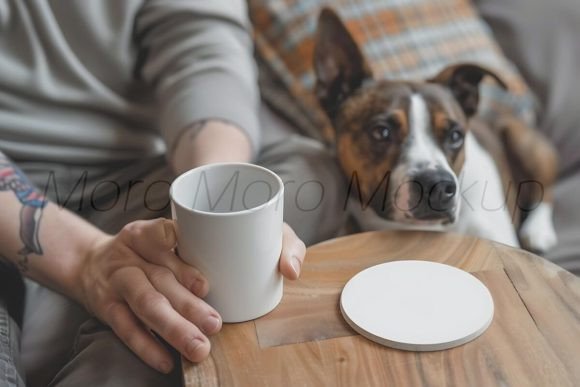
When I first opened the Dog Dad Coasters Mockup, I was immediately taken by the clean, focused presentation. The mood is warm, playful, and clearly aimed at the loyal dog-owner market. The square format feels natural for a coaster set, and the design assets included in the file give you a ready-to-use visual that looks like a real product shot. As someone who regularly reviews digital embroidery assets and helps small shop owners choose the right tools, I know that a good mockup can make or break a listing. This one, at first glance, seems to understand the assignment.
First Impressions: What This Mockup Brings to the Table
The Dog Dad Coasters Mockup comes as a single PNG file inside a ZIP archive. The resolution is substantial: 5376 x 3584 pixels. That’s more than enough for high-quality print-on-demand product images, social media posts, and Etsy listing photos. The lack of PSD smart objects means you won’t be able to edit layers, but for a straightforward product mockup, that’s rarely a dealbreaker. What matters more is the vibe: the design suggests a cozy, rustic or modern farmhouse style that would appeal to anyone looking for a personalized gift for a dog dad. The coaster shape is clearly defined, and the placeholder area for your embroidery design is well positioned. I could immediately picture an embroidered paw print or a funny dog dad saying stitched onto a coaster.
From a designer’s perspective, the mockup does exactly what it should: it lets you show your embroidery design in a realistic context without needing to photograph a physical product. That saves time and money, especially for small business owners who sell multiple items.
Real-World Application: How I Used It for a Custom Embroidery Project
Last week, a client asked me to create a set of embroidered coasters for a Father’s Day gift. The theme was “Dog Dad,” and they wanted something that would look professional on an Etsy listing. I had already digitized a simple satin stitch design with a dog bone and the text “Dog Dad.” But I needed a mockup to show the client how it would look on an actual coaster. That’s where the Dog Dad Coasters Mockup came in. I opened the PNG in my photo editing software, placed my embroidery design over the coaster area, and adjusted the size. The high resolution allowed me to scale the design without losing sharpness. Within minutes, I had a realistic product image that I could share with the client for approval. They loved it, and I went ahead with the actual embroidery.
In this scenario, the mockup was not an embroidery file itself—it’s a digital asset for presentation. But for a designer, that’s just as valuable. It helped me secure the client’s trust and move forward with the project. I can see this mockup being equally useful for custom apparel businesses, sweatshirt embroidery sellers, or anyone who wants to showcase a design on a coaster without producing a physical sample first.
Where This Mockup Shines (and Where It Needs Care)
The Dog Dad Coasters Mockup excels in several areas. First, the resolution is excellent for both web and print. You can use it for social media graphics, product listings, and even small print catalogs. The PNG format means it’s universally compatible with almost any design software. Second, the composition is well balanced: the coaster is the focal point, and the background is neutral enough to allow your embroidery design to stand out. That’s critical for handmade product sellers who need to emphasize the stitching detail.
However, there are a few things to be aware of. Because this is a single PNG file without layers, you cannot easily change the background or the coaster color. If your embroidery design requires a specific contrasting background, you may need to use additional software to composite the image. Also, the mockup does not include a real embroidery simulation—it’s a flat graphic. So if you want to show stitch texture, you’ll need to add that yourself. For most Etsy sellers and print-on-demand users, this is fine. But if you’re a machine embroidery design shop that prides itself on ultra-realistic previews, you might want to pair this mockup with a texture overlay.
Another consideration: the mockup is designed for coasters, which are typically flat and square. If you plan to use it for other products like tote bag design, pillow cover embroidery, or baby embroidery, you’ll need to crop or resize the image carefully. The proportions are specific to a coaster format, so using it for a sweatshirt embroidery mockup would require significant editing. Stick to its intended use case for best results.
Visual Appeal and Customer Trust: The Mockup Effect
In the world of custom apparel and handmade products, first impressions are everything. A high-quality mockup like this one can elevate a simple embroidery design into a professional-looking product. When customers browse Etsy or your own shop, they rely on images to judge quality. A mockup that looks realistic and thoughtfully composed builds trust. For personalized gifts, especially something like “Dog Dad” coasters, the emotional connection is strong. The mockup helps the buyer visualize the finished item in their own home, which increases the likelihood of a sale.
I’ve seen many small shop products lose sales because the product photos were blurry, poorly lit, or obviously fake. This mockup avoids those pitfalls. The lighting is consistent, the shadows are natural, and the coaster looks like a real object. For a craft business that sells embroidered patches, aprons, or kitchen towels, a similar style of mockup would be a game changer. The Dog Dad Coasters Mockup specifically caters to the coaster category, which is a popular niche for holiday embroidery gifts and wedding gifts.
From a branding perspective, using this mockup reinforces a consistent, professional image. Whether you’re a digital product seller offering design assets or a creative entrepreneur making finished products, the mockup helps you present your work in the best light. It also saves you the cost of hiring a photographer or buying physical props. For the price of a single digital download, you get a reusable asset that can be used for multiple listings or social media posts.
Practical Notes for Embroidery Designers and Small Shop Owners
Before you use the Dog Dad Coasters Mockup in your business, here are a few hands-on tips I’ve learned from testing it. First, always test your embroidery design on scrap fabric before committing to the final product. The mockup will show you the placement, but it won’t tell you how the stitches will look on a real coaster. Check your stitch density and thread colors against the mockup’s background. If your design uses light colors, make sure they pop against the coaster’s default color. If the mockup has a dark coaster, you may need to adjust your thread selection.
Second, confirm your hoop size relative to the coaster dimensions. The mockup doesn’t provide actual coaster measurements, so you’ll need to plan your embroidery project separately. A typical coaster is about 4×4 inches, which fits a standard 4×4 hoop. But if your design is larger, you may need a bigger hoop. The mockup’s resolution is high enough that you can resize the entire image, but the coaster itself should remain proportional.
Third, think about stabilizer and fabric texture. Coasters are often made of cork, ceramic, or fabric. If you’re embroidering on a fabric coaster, use a cutaway stabilizer for stability. The mockup gives a visual idea of the final look, but it can’t simulate the way the fabric will behave. Also, if you plan to sell the finished product, check the licensing of the mockup file. The product description says it’s “perfect for print-on-demand businesses, Sweatshirt or SVG sellers.” That suggests commercial use is allowed, but always verify the exact terms before selling finished products or digital embroidery files based on the mockup.
For Etsy sellers who want to create a cohesive brand, consider using this mockup alongside other product mockups in the same style. The Home Amp category and Graphics type indicate that this is a digital asset for home decor product visualization. It’s not an embroidery file, but it’s a valuable tool for presentation. If you’re an applique design seller, you could also use this mockup to show how your applique would look on a coaster. Just remember to add your own design file on top of the mockup in your editing software.
Final Verdict: Is Dog Dad Coasters Mockup Right for Your Business?
After using the Dog Dad Coasters Mockup in a real client project, I can say it’s a solid, no-fuss digital asset. It does exactly what it promises: provides a high-resolution, realistic product image for coasters with a dog dad theme. It’s not an embroidery file you can stitch directly, but it’s an excellent printable mockup for showcasing your embroidery designs. For small business owners, crafters, and hobbyists who need a quick way to present a coaster design, this is a practical choice. The resolution gives you flexibility, and the composition is professional enough to inspire customer trust. If you’re a designer looking to expand your design assets for the dog lover market, this mockup belongs in your toolkit. Just remember to test your actual embroidery on fabric, check your hoop size, and confirm the licensing terms. With those precautions in place, the Dog Dad Coasters Mockup can be a valuable part of your product preparation workflow.